

The Flash Drive, Flash Memory, Pen Drive or USB Stick is a USB Flash Memory Drive and can support up to 128GB disk space. A 8GB is 5600 times more than a 1.44MB floppy disk! A Flash Drive USB disk is a plug and play device. Simply plug it into any USB port and the computer will automatically detect it as a removable drive. Now you can read, write, copy, delete and move data from your hard disk drive to the Flash Drive or vice versa. |
Thanks to its small size, absence of mobile mechanisms (unlike a common hard disk) and affordable price, the Pen Drive is becoming increasingly popular among consumers. |
| Due to its increased popularity, prices have reduced and GByte storage has increased. Unfortunately, users can often forget their Pen Drive in a computer, allowing other users to access their personal data. PenProtect is meant to secure your data in cases such as these. |
| PenProtect software was created to password protect USB Flash Drive or password protect Pen Drive. PenProtect requires no installation. |
| PenProtect is useful to protect your data but is fundamental to solving the problems of privacy that are often found in offices or companies. |
| PenProtect is especially indicated in a business, industrial and military (secret industrial - secret military) protection of data on production activity or organization. |
 | PenProtect works by running the file "PenProtect.exe" located within its USB Flash Drive. The file occupies very little space on your device: about 1 MB! | |||
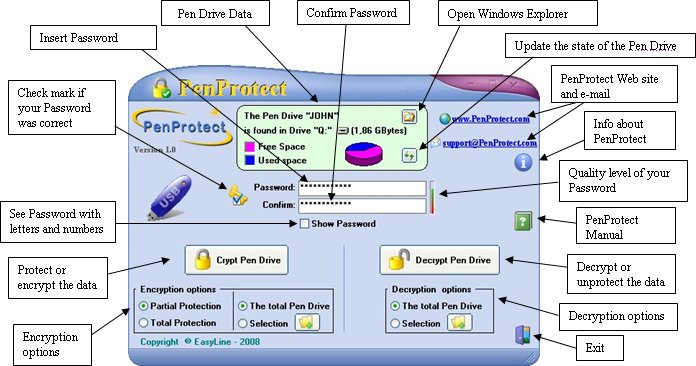
| In order to execute PenProtect, enter your Password (repeat for security in the field Confirm), then press the button to run data protection. Now your Flash Drive and Pen Drive are password-protect! Further information can be found in the Manual. | |||
| Files saved in your USB Flash Drive, Pen Drive or USB Stick are encrypted using a new algorithm, AES with a 256-bit key, chosen also by the Government of the United States of America. For more information on the methodology used and AES security please refer to page in Wikipedia. In the following image, you can see files before and after encryption:  After the encryption process, it will appear that the files and folders have strange names and make no sense. This is the effect of running PenProtect. It is not only encrypts the file content, but also the file name and folders. This makes it safe to insert personal data when naming files. | |||
| To decrypt files run PenProtect, enter the Password and press the button to decrypt them. | |||
| Data remains safe during the encryption and decryption process. After this process is finished, the option to restore the data is available. | |||
| ||||
| The integrity of your data (USB Flash Drive) is continually being monitored by PenProtect. | |||
| To protect the data, there are two possibilities: a "Partial" or a "Total" protection. The "Total" protection option is extremely innovative. Before and after encryption, it analyzes each USB Flash Drive in order to eliminate any file traces. During this process PenProtect program uses a specifically created algorithm. The "Partial" protection option requires about half the time of the "Total" one, but your data protection is not 100% secure. | |||
| Using PenProtect you can password-secure your files and folders saved in Flash Drive, Pen Drive, Flash Memory, USB Stick, USB Key or any memory made with USB Flash Drive. Below there is an image containing most of the formats supported by PenProtect:  | |||
The current version of PenProtect works only on Microsoft Windows (95, 98, Me, 2000, XP, NT4, 2003 and Vista).  1.90 Mb
|


